How to сreate an algorithm
The Control room module allows the system to automatically respond to events. This is done using event-processing algorithms — predefined sequences of actions that are triggered when specific conditions are met.
For example, you can configure the system to:
— notify an operator immediately and mark an event as critical when speed or temperature exceeds a limit
— create a task for a dispatcher and send a reminder to a driver during long idle periods
— record the arrival time and send an SMS to the customer when a vehicle enters a client geofence
Creating an algorithm
-
Go to Algorithms in the top menu of the interface

2. Create a new algorithm
In the List tab, click Add  . The algorithm builder workspace will open
. The algorithm builder workspace will open
3. Build the algorithm using blocks
In the workspace, you can drag and drop blocks to create your scenario.
Each block represents a single step that the system performs when an event is triggered.
Available blocks include:
-
Start — the entry point of the algorithm
-
Text — displays or records a message or comment
-
Command — a system action (for example, sending a notification)
-
Command Template — a predefined action for reuse
-
Condition — a logical check (for example, if temperature exceeds a threshold)
-
Choice — a branching block with multiple possible paths
-
End — completes the algorithm
Additional blocks may be available depending on your system configuration.
4. Arrange and connect the blocks
An algorithm usually starts with a Start block, then includes condition checks and actions, and ends with an End block.

Connect the blocks by dragging links between them.
For example, from a Condition block to a Text block, you can set up two branches:
-
Yes — if the condition is met
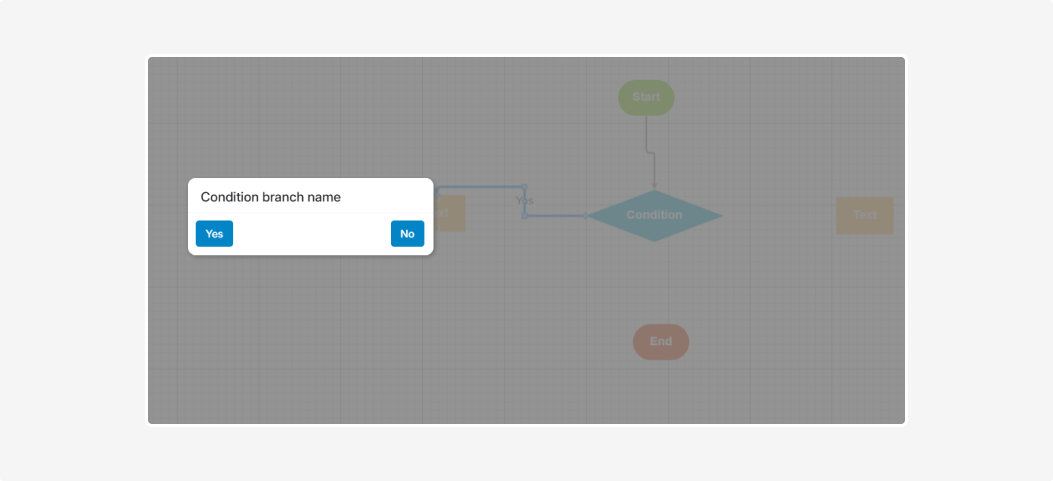
-
No — if the condition is not met

At this stage, you are defining only the structure of the algorithm.
Parameter values (thresholds, notification texts, and so on) are configured later, when the algorithm is linked to a notification.
5. Save the algorithm
When the diagram is ready, click Accept.

In the dialog that appears, enter the algorithm name and click OK. The algorithm will be saved and become available in the list.

Example of a simple algorithm
Task: record an event if the cargo temperature exceeds the allowed limit.
How to build the algorithm:
1. Add a Start block
2. Add a Condition block — it will check whether the temperature is above the limit
The Temperature parameter and threshold are set later when linking the algorithm to a notification.
3. From the Condition block, add Text blocks and connect them using the Yes and No branches
4. Finish the algorithm with an End block and make sure all blocks are connected

This is a basic algorithm that can be used as a foundation for automatic temperature event processing.
The created algorithm does not run by itself. To activate it, you must link the algorithm to a notification.
How to do this is described in the next article.
For a visual walkthrough of setting up the Control Room module, watch the video “How to configure Control room”
|